




 Practice Fusion
 AthenaHealth
 eClinicalWorks
 AdvancedMD
Cloud Faxing for modern healthcare
AI-powered, HIPAA-compliant digital faxing that reads, summarizes, and routes your faxes automatically—all directly inside your EHR.
Built to scale, DashQuill handles millions of faxes annually

Supported EHR systems


How it works
Modern faxing without the outdated hardware
Get your fax number
We provide a new number at no extra charge, or port the one you have had for years. There is no fax machine and no fax line.
Faxes arrive in your EHR
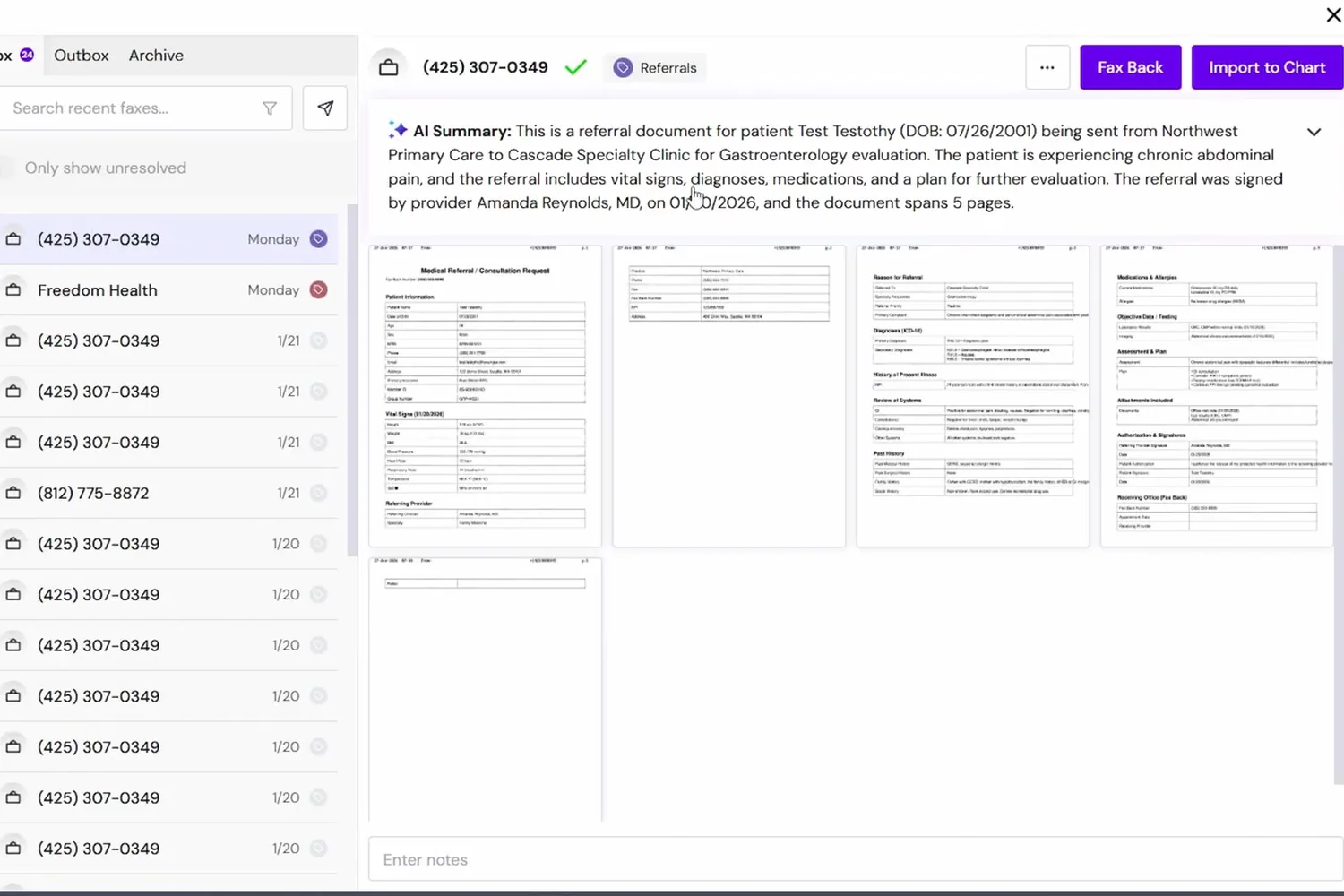
Incoming faxes land in an inbox inside your EHR. Each one is already read by AI, summarized, and matched to a patient.
File it to the chart
Reply, complete requests, and save any fax to the patient's EHR chart in one click, with no downloading and re-uploading in between.
Every fax arrives read, summarised and matched
A custom AI model reads each page, including handwriting, before anyone opens it.
- A one-paragraph summary at the top of every fax
- Patient, date of birth, document type and provider extracted automatically
- The inbox becomes searchable by patient name
- Pick the columns you want: patient, date of birth, type, tag
File it to the chart, or create the chart from it
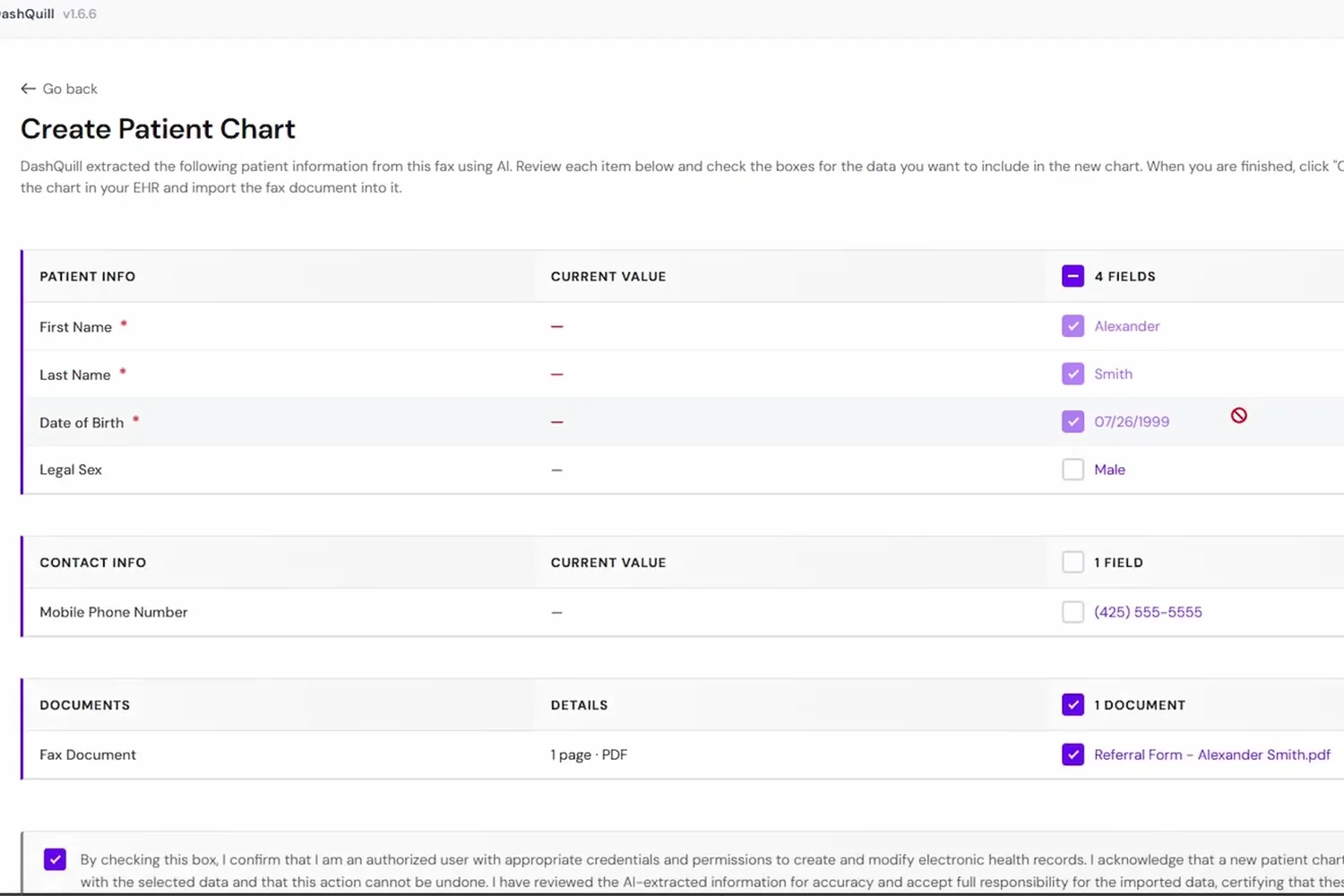
Import already knows who the patient is. If they don't exist, a referral becomes a new chart.
- The matching chart is pre-selected, with the reason shown
- Document name, type and provider are pre-filled
- New patient? Check the extracted fields and click Create Patient Chart
- No download, no re-upload, no PHI on the desktop
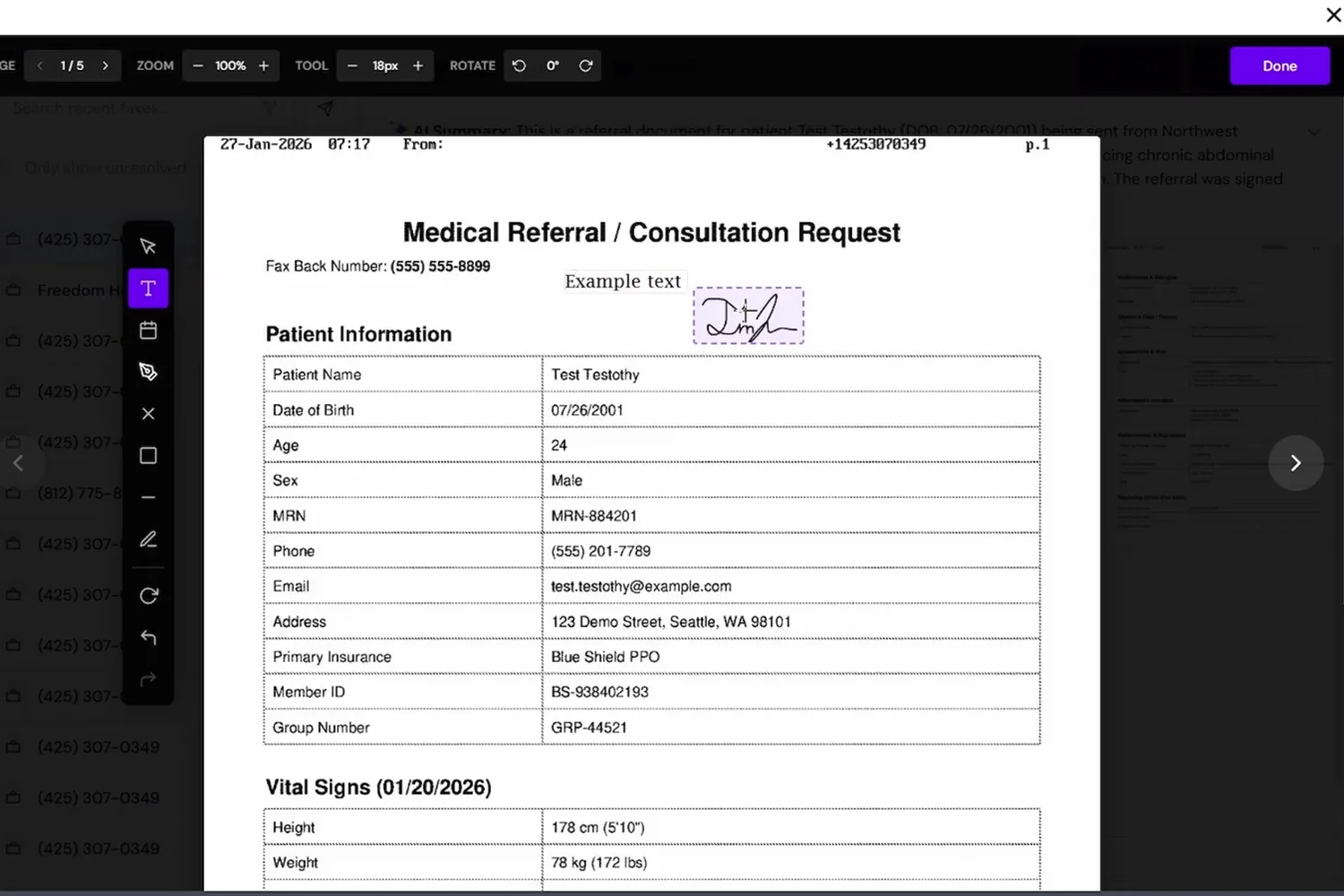
Sign it and fax it back without leaving the inbox
Signature, date and text annotations live in the fax viewer. Nothing to print, scan or open in Acrobat.
- Select the pages that need to go back
- Fax Back drafts to the number it came from
- Annotations travel with it
- Internal notes for your team stay on the fax
Faxes route themselves
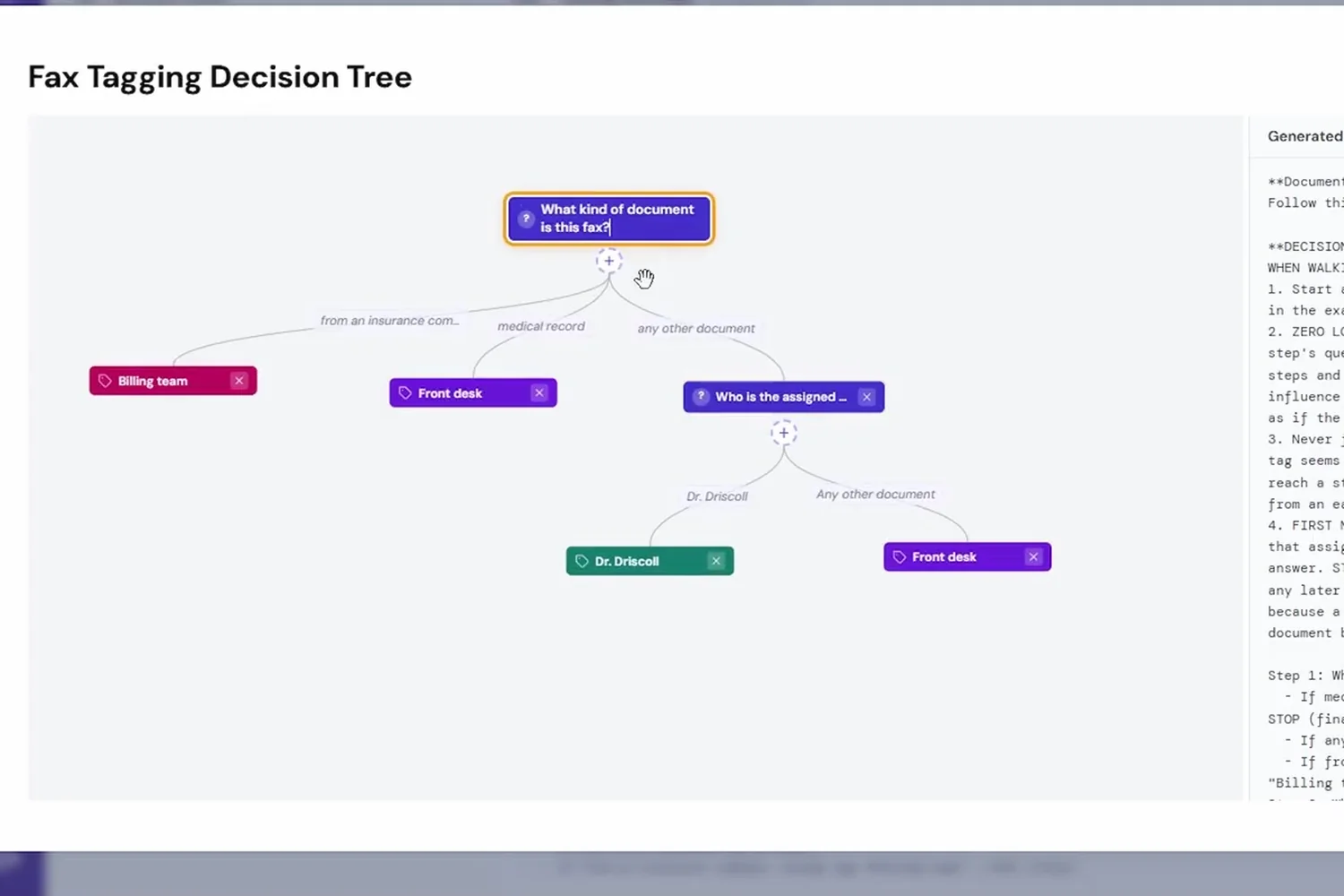
Tags create a private inbox per provider or team. A decision tree tells the AI where each fax belongs.
- Referrals to the coordinator, claims to billing, the rest by provider named
- Simple mode for a few tags, decision tree for many
- Each person filters to their tag once; it sticks
- Resolve marks a fax done for everyone
Send from the chart
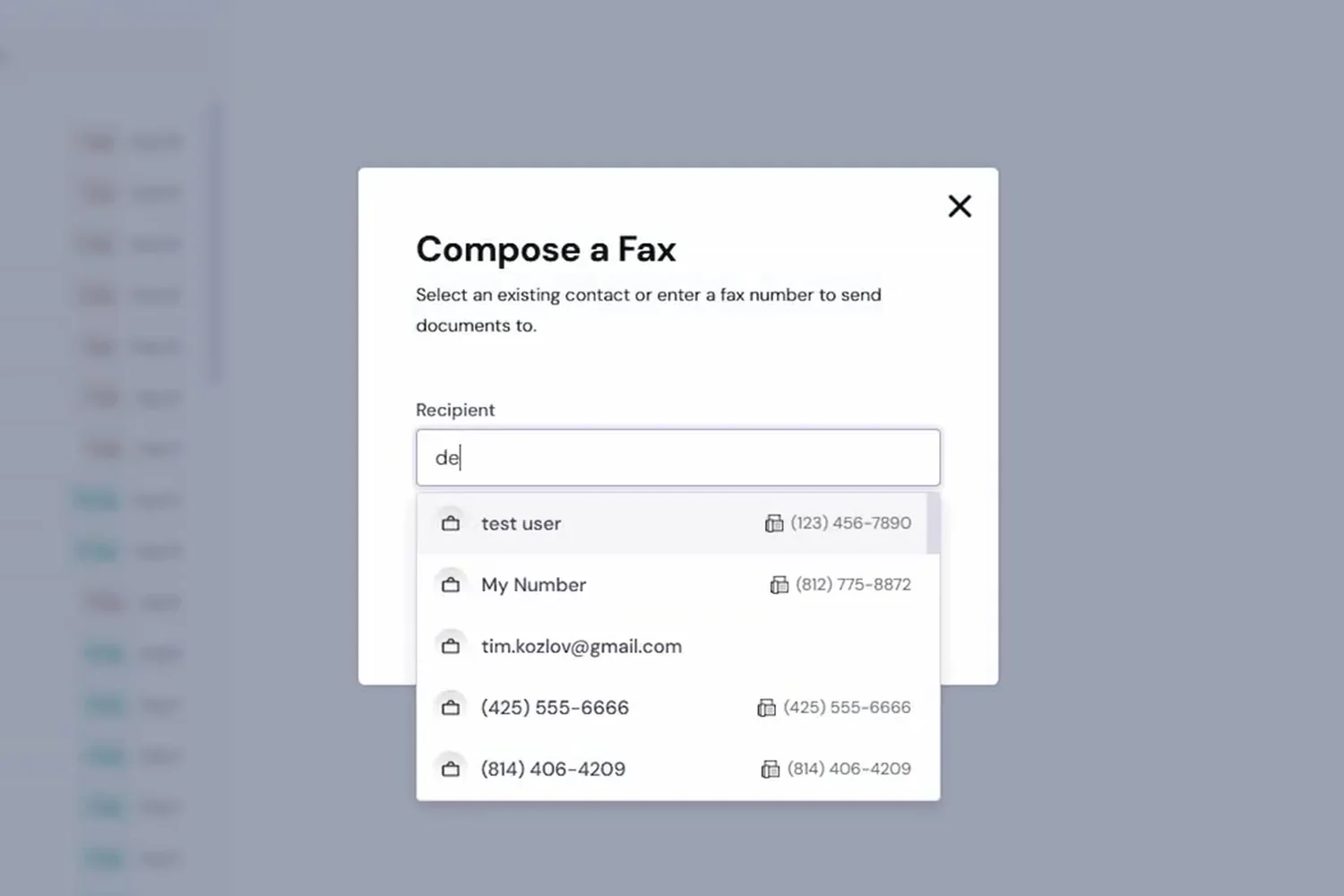
Outbound faxes pull documents straight from the patient's record.
- Search a patient and pick documents from their chart
- Chart notes, labs and medication lists on Practice Fusion
- Saved contacts for the offices and labs you fax weekly
- Choose which of your numbers to send from
What our customers say

DashQuill has streamlined our front-desk intake with an intuitive, all-in-one platform that keeps our team from bouncing between cumbersome technology stacks. Their team is consistently responsive and supportive and the dedicated domains make external sharing of forms simple and professional.

DashQuill came through for us when we desperately needed help. Across our 70+ providers, their AI system sorts up to 120,000 faxes a month, turning what used to be a huge burden on our staff into something fast and reliable.

Partnering with DashQuill has been a game-changer for our practice. Their seamless integration into our EHR system brought immediate improvements in workflow efficiency, reducing administrative burden and allowing our team to focus more on patient care.

I've been using DashQuill's HIPAA-compliant forms with my EHR, Practice Fusion, and I'm very happy with them. The forms are easy for patients to complete and seamlessly integrate into my workflow.

Before DashQuill, we had to manually create a contact for every patient in our secure texting system. Now that contacts sync automatically from our EHR, we can reach out instantly without any setup. It's made patient communication far more convenient.

DashQuill cut our paperwork to near zero. Patient forms now flow directly into our EHR system, saving our team hours each week and streamlining check-ins. Implementation was painless, and within days our forms were auto-uploading.
DashQuill was recommended to us, and within two weeks we completed online training and went live. Tim and John provided excellent support throughout the process, and we appreciate that our calls are answered promptly whenever assistance is needed.
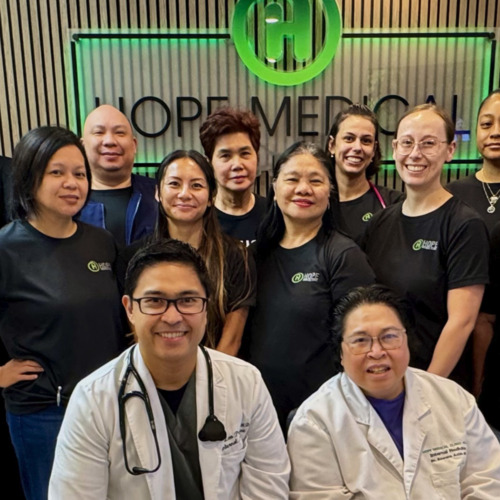
The tagging system in DashQuill Faxing has made it so much easier to stay organized. We can quickly sort and find faxes by type or patient, and it's been a huge help for our office. Really glad this feature is built in.

When our office got very busy during COVID in 2020, DashQuill's patient forms were a lifesaver. They made it easy to speed up our entire intake process, which saved our staff countless hours and helped us keep up with the surge in patients. We still use the same setup today.

The EHR integration for messaging has been great. It's so convenient having all our patient texts connected directly to their charts. We had a few hiccups when hosting our phone number, but the DashQuill team was incredibly helpful and got everything sorted quickly.
With DashQuill's faxing, we turned a paper-heavy process into a fast, digital workflow. Now we have less printing, fewer errors, and more time to spend with patients.
Frequently Asked Questions
Is DashQuill Faxing HIPAA compliant and secure?
Yes. DashQuill Faxing is HIPAA compliant. We follow industry best practices. PHI is encrypted in transit and at rest, access is strictly controlled, data is backed up regularly, and every action is logged. As part of our standard onboarding process, we'll sign a Business Associate Agreement with your office. For more details about our security measures, visit our HIPAA compliance page.
How does the AI in DashQuill Faxing work?
DashQuill's AI reads incoming faxes, including handwritten content, and generates a summary so staff can triage at a glance. It identifies the patient in your EMR and suggests a chart match. It also tags each fax for the right person or group based on its content. For example, referrals go to the referrals coordinator and prescriptions go to Dr. Smith. All of this happens automatically as faxes arrive.
Is the AI processing of faxes HIPAA compliant?
Yes. All AI features are covered by our Business Associate Agreement, and fax content is never used for marketing. The same encryption, access controls, and audit logging that protect your data apply to AI processing.
How is DashQuill Faxing different from other fax services?
Most fax services require opening a separate website or app and downloading faxes to a computer before uploading them to the EHR. That creates HIPAA risk. With DashQuill, faxing runs directly inside the EHR. Files move between the fax inbox and patient charts in one click, in either direction, so sensitive documents never need to be downloaded to office computers.
Can faxes be filled and signed?
Yes. DashQuill has built-in tools for filling forms and signing documents directly in the EHR. There is no need to print, scan, or use Adobe Acrobat. Staff can complete requests, add signatures, and send replies all within the same system.
How does fax tracking and organization work?
Staff can mark each fax as resolved or unresolved to track which ones still need action. Staff can add comments or notes to each fax, categorize them with tags for easy searching, and mark them as resolved once completed. This keeps the inbox organized and ensures nothing falls through the cracks.
Can an existing fax number be used?
Yes. We can port an existing fax number to DashQuill. Alternatively, a new fax number can be provided at no extra charge if starting fresh is preferred.
How are files transferred to and from the EHR?
Files move with one click. Incoming faxes can be transferred directly to a patient's chart documents. When sending a fax, files can be pulled from the EHR or uploaded from a computer. Either way, sensitive files never need to be downloaded to office computers.
How long does onboarding take?
With a new number, setup can be completed in as little as a few days. Porting an existing number from your current carrier takes longer. Our team supports your office along the way, including EHR integration and staff training.
How faxing connects to your EHR
Patient matching, chart filing, and outbound referrals differ by EHR. These pages spell out which of them work today.
See it in 15 minutes. No commitment.
A quick, no-pressure demo of DashQuill Faxing. Ask anything, see how it fits your workflow, and walk away with a personalized quote.