




 Practice Fusion
 AthenaHealth
 eClinicalWorks
 AdvancedMD
A fax inbox breaks when one person can no longer read it all
In a small office, fax works because of one person. The front desk skims each fax, knows who it is for, and files it. Then the practice grows, and at some point that person can no longer read every page that comes in. Faxes sit unread, referrals get missed, and providers start asking the front desk to “check for that fax from cardiology” three times a day.
The fix is not a faster person. It is a process where every fax gets a category, an owner and a status when it arrives, so nobody has to read the whole inbox to find their part of it.
This guide builds that process in order: first where faxes land, then how to divide one inbox among many people, then the triage table and routing policy, and finally how to tell whether it is working. It is written for the office manager or operations lead at a multi-provider group. There is a short section at the end about what we make.
Start with where faxes land: at high volume, eFax beats the machine
The first decision is one most offices made years ago without thinking about it. A fax machine prints every page, and someone sorts, scans and shreds. An eFax service delivers each fax as a PDF in a web portal or email.
| Fax machine or MFP | eFax service | |
|---|---|---|
| Where a fax lands | A paper tray | A web inbox, an email, or a shared folder |
| Getting it into the chart | Scan, then upload | Download, then upload, unless the service integrates with your EHR |
| Who can see it | Whoever walks past the tray | Whoever has the login, from anywhere |
| Finding a fax from last month | Filing cabinet or nothing | Search by date and sender number |
| Finding a fax by patient | Not possible | Usually not, unless someone typed the name or the service reads the fax |
| Sending | Print, feed, dial | Upload a PDF, type a number |
| Cost | Machine, line, consumables | Monthly fee, usually by page volume |
The machine is honestly fine at low volume. At high volume the tray fills faster than anyone can sort it, and nothing is searchable.
Most groups with more than a few providers have already made this move. What they have not always done is fix the two problems the move creates. Those come next.
The first problem eFax creates: every fax becomes a download
An eFax service turns each fax into a file, and files get downloaded. The usual path into a chart is: open the portal, download the PDF, open the EHR, find the patient, open Documents, upload, name it, choose a type, then delete the PDF.
Two things go wrong along the way:
- Time. Six steps per fax, hundreds of times a week.
- PHI on computers. Every download leaves a patient record in a Downloads folder on a shared PC or a laptop that goes home. Deleting is a habit, and habits slip.
The fix is an inbox that files to the chart directly. That can be an EHR fax module, an eFax service that integrates with your EHR, or a third-party inbox embedded in the EHR.
Whichever you choose, the test is the same: between arrival and the patient’s Documents, does the fax ever exist as a file on a staff computer? If yes, you have a cleanup process to enforce forever. The same goes for sending. Faxing a record out should mean picking it from the chart, not exporting it first.
The second problem: everyone shares one inbox
With one fax number and eight providers, there is one list, and everyone scrolls past everyone else’s faxes to find their own.
The old answer was more numbers: one per provider or department. The better answer is one number, with every fax tagged by type and provider and each person’s view filtered to their tags. Each person gets a virtual inbox without the practice publishing a new number.
| A number per provider or department | One number, virtual inboxes | |
|---|---|---|
| What senders see | Many numbers to choose from | One number for the practice |
| A sender picks wrong | The fax lands in the wrong inbox and gets forwarded | Nothing. It is routed by content |
| Adding a provider | Order a number, publish it, update letterhead | Add a tag or a rule |
| A provider leaves | Their number keeps receiving faxes | Reassign their tag |
| Billing correspondence | Needs its own line, or lands in a clinical inbox | Tagged Billing and routed |
| Monthly cost | Usually billed per number | Usually one number |
| Who sees what | Everyone with the login for that number | Each person filters to their tags. A manager sees everything |
The important shift is when the division happens. It happens after receipt, based on what the fax is, rather than before receipt, based on which number the sender happened to dial. Tags can be applied by the front desk, by rules, or by software that reads the fax.
Two caveats. In most tools the filter is a view, not a permission. And a fax can be tagged for the wrong provider, which is fixable with a retag. That is why the policy below puts a person on exceptions.
With the plumbing fixed, look at the process: every fax goes through five steps
Tags only help if someone applies them and someone acts on them. So before writing any rules, name what happens to a fax from start to finish:
- Receipt. The fax arrives and is visible somewhere.
- Patient match. Someone works out which patient it concerns.
- Triage. Someone decides what kind of document it is and how urgent.
- Assignment. It goes to the person or team who will act.
- Filing. It ends up in the chart, and the inbox copy is marked done.
Most high-volume inboxes fail at steps two and three. Receipt and filing work, but nobody is doing the reading in the middle, so faxes wait for whoever gets curious. Naming the steps is half the fix, because it lets you assign each one to a person.
Give every category an owner and a turnaround target
Triage needs something to sort into. List what actually arrives. For most practices it is a short list, and each category has a natural owner.
| Category | Typical examples | Owner | Turnaround target |
|---|---|---|---|
| Referrals | New patient referral, specialist consult request | Referral coordinator | Same day |
| Prescription requests | Pharmacy refill requests, prior authorization forms | Clinical staff for the named provider | Same day |
| Lab and imaging results | Outside labs, radiology reports, pathology | Named provider’s clinical staff | Same day |
| Medical records | Records from another practice, discharge summaries | Medical records or front desk | Two business days |
| Insurance and billing | Claim responses, eligibility, payer correspondence | Billing | Two business days |
| Signature requests | Home health orders, DME orders, forms needing a signature | Named provider | Same day |
| Junk | Marketing, wrong number, blank pages | Front desk | Archive after checking every page |
The targets are examples. Set your own, but set them, because “as soon as possible” means “never” once volume climbs.
Notice that the owner column mixes roles and named providers. That is deliberate. A referral belongs to a role. A lab result belongs to a person. Your routing has to handle both.
Turn the categories into a triage table short enough to memorize
Categories tell you where a fax ends up. The triage table tells the person at step three how to get it there. It should be short enough to memorize and clear enough to hand to a new hire on day one.
| If the fax is… | And it names… | Then tag it | And assign to | Priority |
|---|---|---|---|---|
| A referral | Any provider or none | Referrals | Referral coordinator | Normal, same day |
| A referral marked urgent or STAT | Any | Referrals | Referral coordinator, and call them | High |
| A refill or prior auth request | A specific provider | Rx | That provider’s clinical staff | Normal, same day |
| A refill request | No provider, or one not in the group | Rx | Front desk to identify provider | Exception |
| A lab, imaging or pathology result | A specific provider | Results | That provider’s clinical staff | Normal, same day, unless flagged critical |
| A critical result | Any | Results | Provider directly, plus a phone call | High |
| Records or a discharge summary | Any | Records | Medical records | Normal, two days |
| A claim, EOB or payer letter | Any | Billing | Billing | Normal, two days |
| A document that only needs a signature | A specific provider | Sign | That provider | Normal, same day |
| Multiple patients in one packet | Any | Split | Front desk to split first | Exception |
| Not for us, marketing, blank | Any | Junk | Front desk | Archive after checking every page |
Three rules make the table work:
- One tag per fax on the first pass. “Exception” is a legitimate tag, not a failure.
- Tag before reading closely. Triage is a thirty-second decision, not a review.
- The clinical lead sets priorities. Turnaround targets and “call them” escalations are decided by the clinical lead, not the front desk, and written down before the table goes into use.
Even junk gets every page checked. A wrong-number fax containing another practice’s patient results is a privacy event, not junk.
Then turn the table into a one-page routing policy
The table says what to do with one fax. The policy says who does it, and when, all day. Here is one a group of six providers across two sites could adopt tomorrow. The practice is synthetic. The structure is real.
- Tags. Category tags: Referrals, Rx, Results, Records, Billing, Sign, Junk, Exception. Provider tags: one per provider. A fax can carry one of each.
- First pass: front desk, all day. Every new fax gets a category tag within the hour, plus a provider tag if one is named. Anything that fails the table goes to Exception.
- Second pass: owners. The referral coordinator filters to Referrals. Billing filters to Billing. Each provider’s clinical staff filter to their provider tag plus Rx and Results. Medical records filters to Records. Nobody reads the whole inbox.
- Exceptions: front desk lead, 11:00 and 3:00. The most experienced front desk person finds the patient, finds the provider, splits the packet, or calls the sender. Then they retag and the fax flows to its owner.
- Filing. Whoever acts on a fax files it and marks it resolved. Filing is not a separate department’s job, because that creates a second pile.
- Done. A fax is done when it is filed and marked resolved. Unresolved faxes older than their target go on a report the office manager sees every morning.
That is the whole policy, and it fits on one page. The tags are what let each person see only their share, and they work the same whether a person or a program applies them.
Plan for the three things that break the policy
A policy this simple holds for most faxes. Three kinds of fax will test it as soon as volume climbs, and each needs a rule decided in advance.
Duplicates. Senders re-fax when they do not hear back. Archive the second copy only after a person has opened both and confirmed they are the same document. Same sender, patient and page count is a reason to check, not proof, because a corrected result looks exactly like that. Filing duplicates makes the chart worse. Archiving a corrected result unread is worse still.
Multi-patient packets. A pharmacy sends twelve refill requests as one fax. A chart holds one patient’s documents, so the fax goes to the Split tag, gets cut into per-patient pieces, and each piece is triaged normally. Splitting is real work and should be counted as such.
The exception queue. No patient name, a provider who left, an illegible page, a fax for a different practice. A person with authority to make calls works the queue twice a day, and it should be empty at close of business. If it is not, it grows without limit.
Know it is working by tracking two numbers
Once the policy is running, two numbers tell you whether the inbox is healthy: how many faxes are unresolved, and how old the oldest one is. Track both daily. Do not bother with “faxes received,” which only tells you how busy the senders are.
A backlog will form at some point. When it does:
- Sort by category and hand each owner their tag. Do not have everyone attack the whole inbox.
- Work newest first, so today’s referrals and results do not wait behind last month’s records.
- Set a daily quota for the old ones.
- Read every fax before filing or archiving it. Filing a backlog unread is how a critical result ends up in a chart with nobody having seen it. If the team cannot keep that pace, the fix is temporary hours or help, not skipping the reading.
Search is the other sign of health. “Did the cardiology report come in for Mr. Nguyen” should take seconds, not a scroll through the week. That requires a patient recorded on each fax, which an inbox that stores only sender number and arrival time cannot give you.
Only then automate: software reads, people decide
Everything above can be done by people, and in a small office it should be. Software earns its keep on the steps that scale badly, which are the reading steps. The judgment steps should stay with people.
| Software can take over | People should keep |
|---|---|
| Reading the identifying pages | Confirming a patient match before anything is filed |
| Extracting the patient and document type | Working the exception queue |
| Applying the decision table | Checking for duplicates |
| Filing without a download-and-upload cycle | Reviewing a split before the pieces are filed |
The order matters, which is why this section comes last. An office that turns on automatic sorting without deciding who owns each tag gets a well-sorted inbox that nobody works. Decide the policy first.
Where DashQuill fits
We make a fax inbox that runs inside Practice Fusion, athenahealth, eClinicalWorks and AdvancedMD. It is the one-number, virtual-inbox design described above.
- Number. Your existing number is ported or a new one provided. Several numbers can feed one inbox.
- Reading and tagging. Every incoming fax is read by our own model, handwriting included, and tagged through a decision tree you build from your own triage table.
- Views. Each person filters to their tags, and a manager sees everything.
- Splitting. Multi-patient packets can be split by page selection or automatically by patient.
- Filing. A search is already run with the name read off the fax. Click the right chart, then click upload, with the document name prefilled. The fax is never saved as a file on the computer.
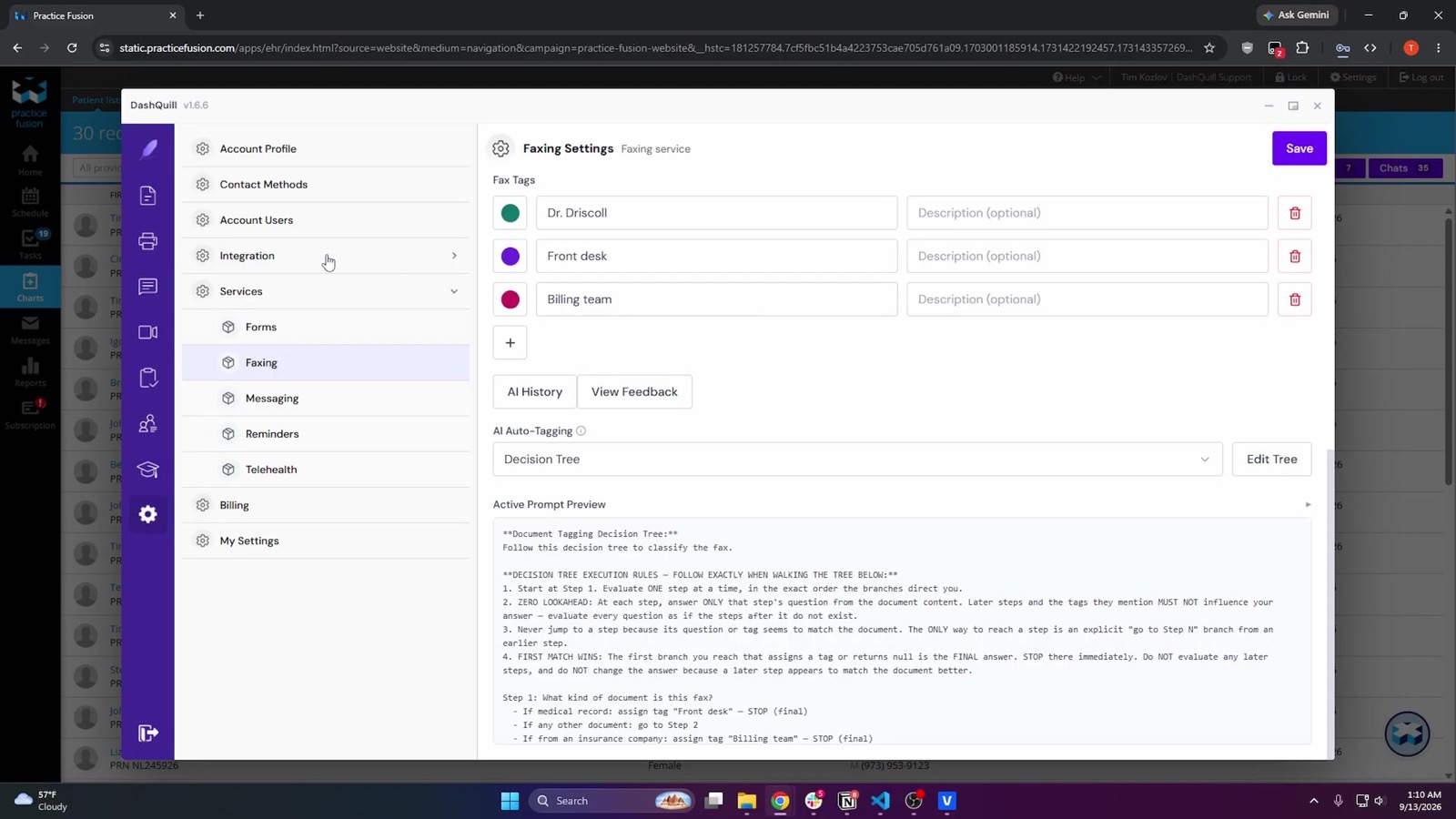
One of our customers, a primary care group with more than seventy providers, runs this process at up to 120,000 faxes a month.
To see the triage table running as a decision tree on your own fax volume, book a 15-minute demo. For the step-by-step of filing one fax into a chart, the Practice Fusion fax guide walks through a referral from arrival to chart. If you are evaluating the reading part specifically, the AI fax sorting guide breaks it into the four capabilities to test.