




 Practice Fusion
 AthenaHealth
 eClinicalWorks
 AdvancedMD
A scribe that sees the chart writes a sharper note, and a riskier one
An AI scribe that only hears the visit knows what was said. A scribe that can also see the chart knows what was already true before the visit started: the problem list, the medications, the allergies.
The second kind can write “continue lisinopril 10 mg” instead of “continue blood pressure medication.” It can also carry a medication the patient stopped two years ago into today’s note, because nobody cleaned up the list.
This guide is about that trade. It follows a note from the conversation in the room to the encounter in the EHR: what the scribe hears, what the chart adds, where that goes wrong, why the clinician’s review is not optional, and what happens when the note is filed. We sell a scribe, and there is a section about it at the end. The rest applies to any scribe you evaluate.
First, know which of three kinds of scribe you are looking at
Ambient scribes are sold in three shapes, and the shape decides how close the scribe can get to the chart.
- Standalone apps record on a phone or laptop and generate a note. The clinician pastes it into the EHR.
- EHR-native scribes are built or licensed by the EHR vendor and sit inside the chart.
- Embedded third-party scribes run inside the EHR through an extension or integration. They may or may not read the chart or write back to it.
The questions in this guide apply to all three. The answers differ a lot.
Every note starts as a transcript, which only holds what was said out loud
Whatever its shape, a scribe begins the same way: the visit is recorded, speech becomes text, and a model turns that text into a note in the structure you asked for. For a lot of visits that is enough.
The limit is what people actually say in an exam room. Patients say “my cholesterol pill.” Clinicians say “we’ll keep that the same.” Nobody reads the medication list aloud with doses. The transcript has the conversation, not the chart, so the note ends up with vague references where the chart has specifics.
Chart context fills in the specifics, and every one comes from the chart
Chart context closes that gap. The scribe is handed the patient’s active diagnoses, current medications and allergies, usually when the clinician selects the patient at the start of a session, and the model gets that context together with the transcript.
Here is roughly what changes in the note. Synthetic patient, synthetic visit:
| The patient says | Transcript-only note | Note with chart context |
|---|---|---|
| ”I’m still on the blood pressure one and the cholesterol one.” | Patient continues antihypertensive and lipid-lowering medication. | Patient continues lisinopril 10 mg daily and atorvastatin 20 mg daily. |
| ”The rash is better since I stopped the antibiotic.” | Rash improving after discontinuing antibiotic. | Rash improving after discontinuing amoxicillin. Note: penicillin allergy is documented in the chart; consider updating allergy list. |
| ”My knee’s been worse.” | Patient reports worsening knee pain. | Patient reports worsening right knee pain; history of right knee osteoarthritis on problem list. |
The right-hand column is more useful and more dangerous. Every specific it adds came from the chart, and the chart can be wrong. Two things to ask in a demo:
- When is the snapshot taken? If the chart is read once at the start, a medication list updated during the visit will not be in the note.
- Does it flag conflicts? The allergy flag in row two is the ceiling, not the floor. It only happens if the scribe was built to do it, so do not assume it.
Which means stale chart data is the main risk. Check three cases
If the note is only as good as the chart, the question becomes how good the chart is. Medication lists accumulate: a drug stopped by a specialist, an antibiotic course finished months ago, a dose changed by phone and never updated. A scribe with chart context will faithfully reflect that list unless the visit contradicts it.
Three situations come up constantly, and each has a right and a wrong way to handle it:
| Case | A good note | A bad note |
|---|---|---|
| The chart says metformin 500 mg; the patient says it was raised to 1000 mg | Reflects the conversation and flags the discrepancy | Silently picks one |
| A sulfa allergy is on file and never comes up | Leaves it out of the assessment, or lists it in a summary section | ”Confirms” the allergy as though it was discussed |
| The patient mentions a new diagnosis that is not on the problem list | Records it as reported by the patient | Records it as an established diagnosis |
The common thread: a note should make clear what came from the visit and what came from the record. A scribe that blends the two into one confident paragraph is harder to review and easier to trust wrongly.
So the clinician still reviews every note, with the transcript beside it
Since no scribe can know which parts of the chart are stale, the last line of defense is the person who was in the room. Chart context makes that review more important, not less, because the draft now contains specifics the provider never said aloud.
Four things make review real rather than ceremonial:
- The session should land as a draft. The provider reads it, edits it, and only then files it. Be wary of any path where a note reaches the chart without that step.
- Know what “reviewed” means. In most products it means the provider clicked a button and accepted responsibility. The software does not check that they read every line. That is fine as long as the practice knows it.
- Use your own template. Review is faster when the note has the provider’s own headings in their usual order, because then review is reading rather than reorganizing. Ask whether the template is yours or the vendor’s.
- Keep the transcript next to the note, ideally with speakers labeled. When a line looks wrong, the provider should be able to find the moment it came from. A note without the transcript behind it is a claim with no evidence.
After review comes filing, and that is a separate step
The reviewed note still has to reach the chart, and this is the part vendors compress and buyers miss. What looks like one button is two steps:
- Generate the note. Transcript plus context in, structured draft out. This works the same on every EHR, because the EHR is not involved yet.
- Write the note to the chart. Create or select an encounter and put the reviewed note into it. This is entirely EHR-specific, and it is where “integrated” claims need checking.
A scribe can be excellent at step one and do nothing at step two, leaving the provider to copy and paste. That is not a failure, but it is a different product from one that files the note, and the price should reflect which one you are buying.
Ask every vendor to answer these four questions for your EHR specifically:
- Can it start from the chart?
- Can it pull diagnoses, medications and allergies into the session?
- Can it create the encounter?
- Can it file the reviewed note into that encounter?
A vendor who cannot answer per EHR is describing step one and calling it step two.
Take these eight questions to any scribe vendor
That is the whole path, from the room to the encounter. Here it is again as the questions to ask along the way:
- Does the scribe see the chart, or only hear the visit? Which fields?
- When the chart and the visit disagree, what does the note say?
- Can I see the transcript beside the note, with speakers labeled?
- Is the note built on my template or yours?
- Can the note be filed without a clinician reviewing it? The right answer is no.
- On my EHR, does the tool create the encounter and file the note, or do I paste it?
- Does it work for in-person visits and dictation, or only telehealth?
- Where is the audio processed and stored, and is all of it covered by the BAA?
And ask for the study behind any accuracy or time-saved claim
One last caution. Be careful with any vendor who says chart context makes notes measurably more accurate, saves a specific number of minutes per note, or improves outcomes or reimbursement. If they give you a number, ask for the study.
What chart context does is concrete: it gives the model the problem list, medications and allergies so the draft can reference them by name. Whether that makes a better note on a given day depends on how current the chart is and how carefully the provider reviews.
Where DashQuill fits
Our scribe runs from two buttons on the patient’s chart in Practice Fusion, athenahealth, eClinicalWorks and AdvancedMD:
- Meet starts a telehealth visit with the scribe listening.
- Scribe records an in-person visit or a provider dictating after the fact.
The provider picks their own template, records, and gets a draft note with the transcript in its own tab. In a video visit each participant is recorded on their own track, so the transcript is labeled by speaker.
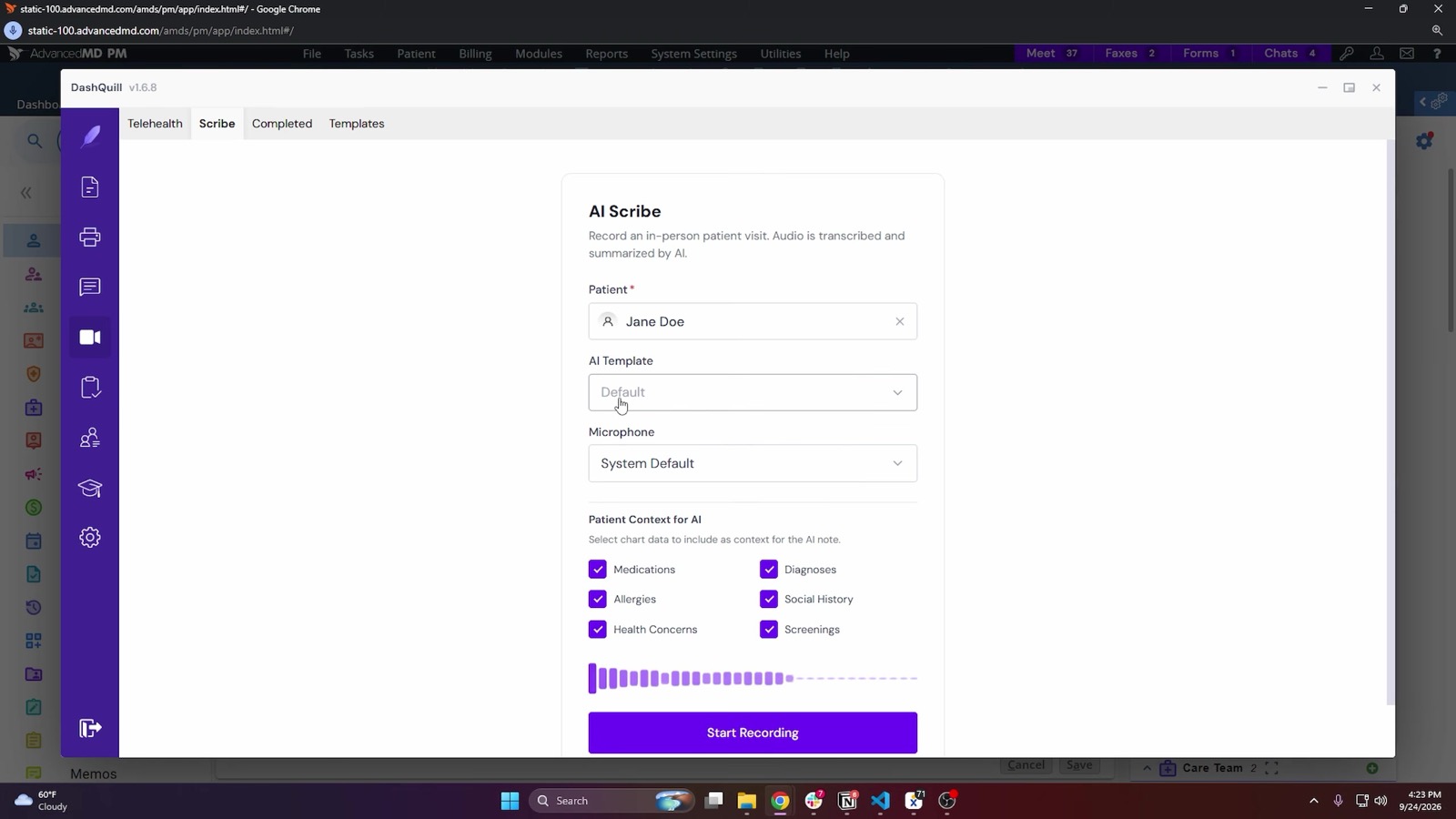
- Chart context. In Practice Fusion, starting a session reads the patient’s active diagnoses with ICD-10 codes, medications with strength and sig, allergies with reactions, social history, health concerns and screenings, with a checkbox for each group.
- Review. Nothing is filed until the provider opens the import step and confirms they have reviewed the note.
- Filing. In Practice Fusion, the provider picks an unsigned encounter or creates one for today, and the note’s sections are written into chief complaint, subjective, objective, assessment and plan.
- Privacy. Audio, transcription and note generation are covered by the BAA. Audio is held encrypted and deleted on a short retention schedule.
It is built for providers at small and mid-size practices.
The detail for each EHR is on its integration page: Practice Fusion, athenahealth, eClinicalWorks and AdvancedMD. To see it on a test patient in your EHR, book a 15-minute demo.