




 Practice Fusion
 AthenaHealth
 eClinicalWorks
 AdvancedMD
A buyer’s guide, written by a seller
Disclosure first: we sell intake software, and there is a section about ours at the end. Read this the way you would read a mechanic’s guide to buying a used car. The advice is meant to be good on its own. The mechanic still wants your business.
The guide moves in the order a purchase does. It starts with a map of the kinds of intake software that exist, then the one question that separates them, then a scorecard of things to make every vendor demonstrate, and finally the business questions and a checklist to send before the demo.
One rule runs through all of it. A feature counts only when you have seen it live: not on a slide or in a video, but on a test patient in the EHR you actually use, with your own form.
Start with the map: there are five kinds of intake tool
Every practice already has intake software, even if it is a clipboard. The options fall into five groups, and what separates them is how much work is left for staff once the patient is done.
| Tool | What the patient does | What staff still do |
|---|---|---|
| Paper | Fills a clipboard in the lobby | Type everything, scan the pages |
| Fillable PDF | Fills it on a laptop; on a phone it often opens flat | Open the PDF and type everything |
| Online form builder | Fills it on a phone, no account | Type everything from a spreadsheet, email or PDF |
| EHR patient portal | Registers, logs in, fills it. Many never do | Run a paper fallback alongside it |
| Chart-writing intake tool | Opens a text link, no login | Review the answers and write them to the chart |
Only the last group removes the retyping. It is also the group where the word “integration” gets stretched the furthest, which is why the rest of this guide is about how to test it.
One question separates them: does it write data to the chart, or deliver a file?
Every intake product says it “integrates with your EHR.” That phrase covers two very different things:
- File upload. A completed PDF lands in the patient’s documents. It saves you a scanner and nothing else. Somebody still opens it and types the demographics, insurance and pharmacy.
- Structured import. Each form field is mapped to a chart field and written, with a review step in between.
You can tell them apart in one minute. Have the vendor fill a form with a fake patient’s new address, then show you where the address appears in the EHR. If it is an editable field in the patient profile, that is structured. If it is only inside a PDF in Documents, that is a file upload.
Everything else in this guide is secondary to that answer.
So score every vendor on ten things, shown live in your EHR
Once you know what you are looking for, the scorecard turns it into ten demonstrations. “Shown live in my EHR” is the only yes. “On the roadmap,” “in our other integration” and “we can do that” are all no until demonstrated.
| # | Ask the vendor to demonstrate | Why it matters | Yes / No |
|---|---|---|---|
| 1 | A form field landing in a chart field, live, in my EHR | Separates structured import from PDF upload | |
| 2 | The list of chart fields written, in writing, per EHR | Vendors support different fields on different EHRs | |
| 3 | A review screen showing the current chart value beside the new value, with per-field accept | Stops a typo overwriting correct data | |
| 4 | Matching a submission to an existing chart, with two candidates and with none | Duplicates are the most common real-world failure | |
| 5 | Creating a new patient chart from a submission | New patients often have no chart yet | |
| 6 | Insurance from a card photo, with staff picking payer and plan from the EHR’s list | Patient-typed plan names are wrong often enough to cost money | |
| 7 | Signed forms and card images landing in the chart without touching a desktop | Downloads folders full of PHI are a compliance problem | |
| 8 | The patient experience on a phone, with no account or portal login | Logins are where completion rates drop | |
| 9 | Multi-location: separate form sets, branding and inboxes under one login | One shared inbox across sites becomes a sorting job | |
| 10 | The signed BAA, encryption, access controls and audit logs, in plain terms | Non-negotiable, and easy to check |
Rows one through seven decide whether the data entry problem is solved. Eight and nine decide whether patients and staff will actually use it. Ten is the floor.
The next few sections walk through the rows where a good answer and a bad answer look similar from a distance.
A structured form shows current and new values side by side
Start with what “structured” buys you. To an EHR, a field on a PDF or a form builder is a rectangle with text in it. A structured form knows the rectangle is the patient’s address, so it can compare it to the address on file, show the difference, and write it to the right place.
The practical test is the two-column screen: current value on the left, new value on the right, a checkbox per row. A vendor who cannot show you that screen is writing blind or not writing at all.
Staff should accept changes one field at a time
That screen is only safe if each row can be accepted or rejected on its own. Never let a tool overwrite a chart wholesale. A returning patient who mistypes their date of birth should not corrupt a chart that had it right. Staff should be able to accept the new phone number and reject the wrong birth date in the same pass.
Prefilled forms carry PHI, so ask what protects the link
Some vendors go a step further and prefill the form from the chart, so a returning patient only corrects what changed. It is convenient, and it changes the risk: the form now contains PHI before the patient has proved who they are. Ask what stands between the link and that data:
- A private, unguessable link sent to the patient’s own phone is one layer.
- A question before the form opens, such as last name and date of birth, is a second layer. It is a weak one, since anyone holding the phone likely knows both.
Neither is authentication in the sense your portal uses. Decide with your compliance officer whether prefilling is worth it for your patients. A blank form carries no PHI and should open without friction.
Test patient matching with three cases, not one
Before anything is written, the tool has to find the right chart. A demo will show you the case that works. Ask for all three:
| Case | Right answer |
|---|---|
| Exact match | Chart is preselected, staff confirm |
| Near match (same name, different birth date) | Candidates are listed, staff pick, nothing is written until they do |
| No match | Staff create a chart from the submission on the spot |
The wrong answer is any flow where a near match is written automatically. “Our matching is very accurate” does not answer the question. Ask what happens when it is wrong.
Insurance and pharmacy should stay with a person
Two fields should not be fully automated, however good the rest of the import is. A vendor who claims otherwise is optimizing the demo, not your chart.
Insurance. Patients do not reliably know their plan. The workable design is a card photo, with staff selecting the payer and plan from the EHR’s list while looking at the image. The member ID and group number the patient typed should sit beside the card so they can be corrected. Ask what happens with a blurry photo. The answer should be “the rest of the import proceeds and insurance waits,” not “the import fails.”
Pharmacy. Free text never matches the directory exactly. The tool should search the directory, show what the patient typed next to the results, and let a person pick.
With more than one location, demo the multi-site setup
If you have a second site, the same demo needs four more questions:
- Can each location have its own packet, branding and form link under one account?
- Can staff at site A see only site A’s submissions, and a manager see both?
- Can a form be sent from inside the EHR by searching the patient, so contact details come from the chart?
- Does the lobby tablet at each site point at that site’s forms?
These are easy to skip in a single-office demo and painful to discover after rollout.
Then come the business questions, starting with your existing forms
A product that passes the demo still has to be set up, secured and paid for. Start with setup, because it is where the timeline hides.
Most offices have paperwork they refined for years and do not want rebuilt from scratch. Some vendors rebuild it by hand over a few weeks. Some convert it automatically and have a person check. Some hand you a form builder and wish you luck. Any of these can be fine. Ask how long it takes, who does the work, and who checks the result before a patient sees it.
Security should be a quick conversation
A vendor who handles PHI for a living should answer these without hesitation. Ask for:
- A signed Business Associate Agreement as part of onboarding, not an add-on.
- Encryption of PHI in transit and at rest.
- Role-based access, and an audit log of who imported what.
- Where the data is hosted, and whether any of it leaves the country.
- Whether PHI is ever downloaded to a staff computer in the normal workflow.
- A SOC 2 report or comparable third-party assessment, or whether one is in progress.
“We’re HIPAA certified” is not an answer. There is no government HIPAA certification. What a vendor can show you is a signed BAA, a description of its safeguards, and any private assessment it has had done.
On price, the structure matters more than the number
Intake pricing is all over the map, so compare how vendors charge before you compare what they charge.
- What is the unit? Per provider, location, submission or practice. Per-submission pricing punishes you for the thing you are trying to increase.
- Is there a cap on forms or submissions?
- What does the setup fee include? Form conversion, training, how many forms.
- What is the contract term? Month to month is a sign the vendor expects to earn renewal.
- Is there a free trial? Be a little suspicious of one. Connecting to your EHR and converting your forms is real work, and a trial that skips it shows you a different product from the one you will use.
Finally, send this demo checklist before the call
Everything above fits into one fifteen-minute demo if the vendor knows what you want to see. Send this ahead of time so nobody spends the call on slides:
- Open the intake tool from inside my EHR, in a test environment.
- Send one of my actual forms to a test phone number.
- Fill it on the phone. No account, no portal.
- Import it. Show the patient match, the review screen and the resulting chart.
- Show a returning patient with one changed field.
- Show a new patient with no chart.
- Show insurance from a card photo and the payer and plan selection.
- Show where the signed form ends up.
- Tell me which fields are written today on my EHR, and which are not.
- Send me the BAA and the price sheet.
Where DashQuill fits
We make a chart-writing intake tool that runs inside Practice Fusion, athenahealth, eClinicalWorks and AdvancedMD, and we will run the scorecard live in your EHR, on a test patient, with one of your forms.
- Structured import. Patients fill the form from a text link with no login. Staff match the submission to a chart, review current and new values side by side, and accept changes one field at a time.
- Written to the chart. Demographics, contacts, emergency contacts, pharmacy and signed documents, on all four EHRs. It can also create the chart for a new patient. The full field list for each EHR is on its integration page, and we will put it in writing for yours.
- Existing forms. PDF forms are converted by an automated pass and checked by our onboarding team before you send them. Paper and Word forms are rebuilt. Most practices are live within a few days.
- Security. We sign a BAA at onboarding and host in the US. Forms open blank by default and carry no PHI. Our HIPAA page has the detail.
- Pricing. Per service you turn on, customized to your locations and volume. Month to month, with a one-time setup fee.
It is built for small and mid-size practices, including multi-location groups, and our team handles onboarding with you.
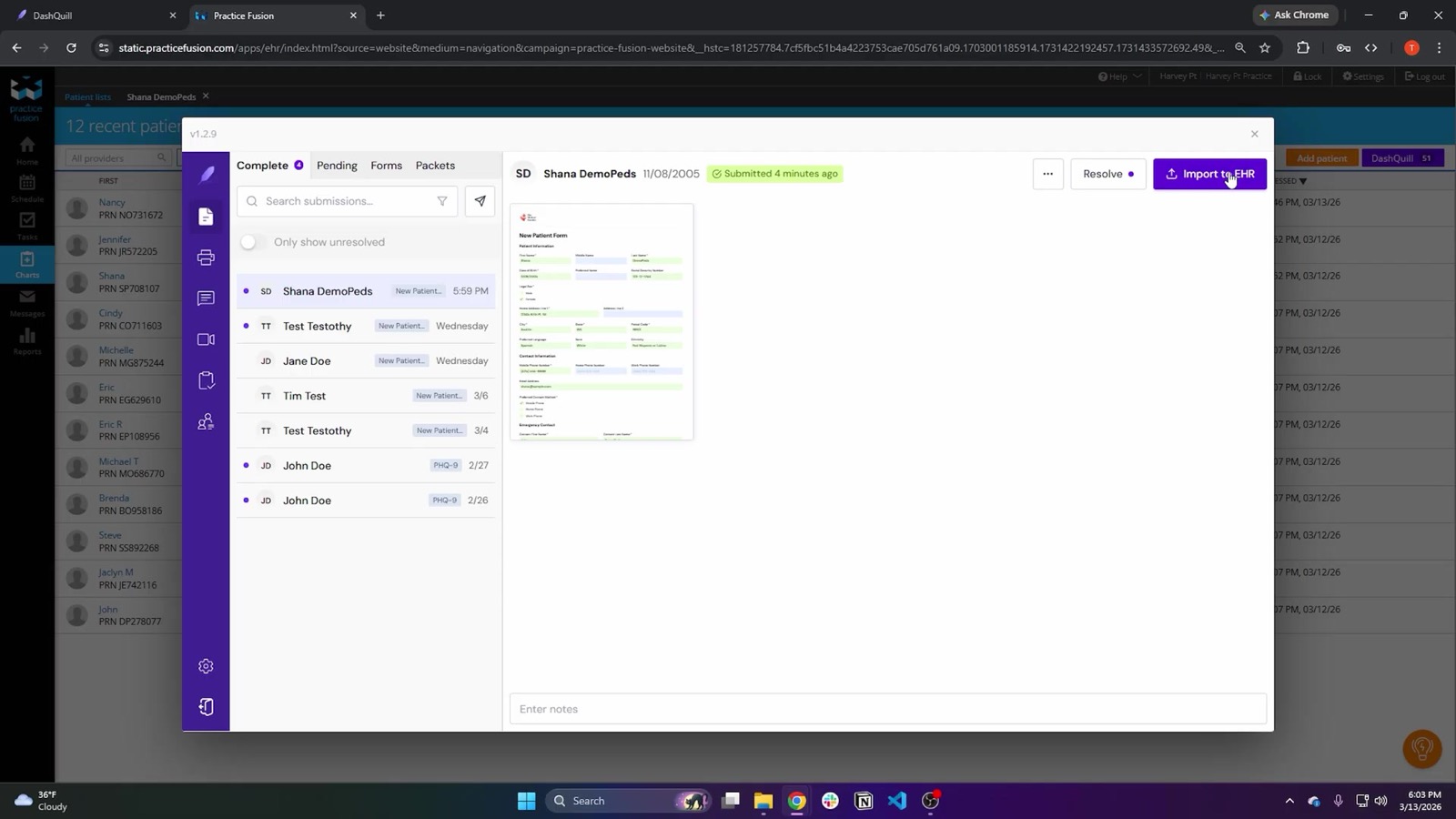
To see the checklist run live, book a 15-minute demo for your EHR. We will use your EHR, a test patient and one of your forms. If you are on Practice Fusion and want the field-level detail first, the Practice Fusion intake guide walks through the import step by step.