




 Practice Fusion
 AthenaHealth
 eClinicalWorks
 AdvancedMD
Previsit intake only works when three things are true
Every practice would like patients to arrive with their paperwork done. Most still hand over a clipboard, because somewhere between booking and check-in the plan falls apart. It holds together only when three things are true:
- The form reaches the patient in a channel they open, which for most people is a text message.
- It can be filled on a phone with no account, app or portal password.
- The answers land in the athenahealth chart as data, not as a PDF somebody retypes at 7:45 the next morning.
Miss any one and previsit intake quietly turns back into lobby intake.
This guide follows one patient’s paperwork from the booking call to the chart, in order, and says who should own each step. It is written for whoever runs the front desk at an athenahealth practice. There is a short note about our own tool at the end.
It starts on the phone: collect the minimum and send forms for the rest
The first decision is made when a new patient calls, and it shapes everything after it: how much does the scheduler collect on that call?
A full phone intake means asking for everything, including insurance read out digit by digit. It takes ten or fifteen minutes per patient, ties up the line, and builds a chart from what the scheduler heard. The alternative is to take only what you need to hold the slot and text a link for everything else.
| Full phone intake | Minimum by phone, forms for the rest | |
|---|---|---|
| Collected on the call | Everything | Name, date of birth, mobile number, reason for visit |
| Phone time | Long | A few minutes |
| Who types the details | The scheduler | The patient, on their own phone |
| Insurance | Heard and typed, corrected at the visit | Card photographed by the patient, checked by staff |
| Consents | Signed at the visit or on paper | Signed before the visit |
| Failure mode | Misheard digits, long hold times | Patients who never finish |
| Staff time | High, all up front | Lower, spread across sending, checking and chasing |
Minimum-plus-forms wins on staff time and insurance accuracy. Its weakness is the patient who never finishes, which is why the rest of this guide includes a chase step and a lobby fallback.
Next, choose a form that writes to the chart, or plan to retype
Once you have decided to send a form, the question is which kind. “Send them a form” can mean four different things, and the choice decides how much typing is left at the very end.
| Form | Fills well on a phone | Needs a login | Comes back as |
|---|---|---|---|
| Fillable PDF by email | Often not | No | A PDF staff retype |
| Online form builder | Yes | No | A spreadsheet row or PDF staff retype |
| athenahealth patient portal | Only after registering | Yes, and many patients never register | Some demographics written to the chart |
| Chart-writing form | Yes | No | Data staff review and write to the chart |
The portal has the right idea, since it writes to the chart, but the login is where it loses patients. Only the chart-writing form both fills well on a phone and removes the retyping. Several vendors offer one, and the section on the last step explains how to tell them apart.
The process below is the same whichever form you pick. The amount of typing at the end is not.
Give every step between booking and check-in an owner
Between the phone call and the visit there are seven small jobs. Previsit intake fails when one of them belongs to nobody. Roles here are suggestions, and small offices collapse them into one person.
| Step | When | Who | Done when |
|---|---|---|---|
| Decide which forms each visit type needs | Once, then quarterly | Office manager | A named packet per visit type: new patient, annual, procedure, telehealth |
| Collect the minimum and send the packet | At booking | Scheduler | Patient has a link by text, and by email if they gave one |
| Watch the pending list | Daily, morning | Front desk | Every patient on tomorrow’s schedule is complete or flagged |
| Chase incomplete forms | Day before the visit | Front desk | One reminder sent; unreachable patients marked for lobby intake |
| Lobby fallback | Day of visit | Front desk | Tablet or clipboard handed to anyone who did not finish |
| Get it into the chart | Before the visit | Front desk or intake coordinator | Demographics, insurance, pharmacy and signed documents are in athenahealth |
| Mark done | After import | Whoever imported | Submission marked so nobody enters it twice |
Two rows get skipped more than the others. Skip “watch the pending list” and you find out at check-in. Skip “get it into the chart before the visit” and the clinician opens a chart with last year’s insurance.
The next sections take the steps that need the most thought, in the order they happen.
At booking: send the packet by text, with no login
The moment the appointment is made is the best moment to send the packet. Four habits make it far more likely to come back complete:
- Send at booking. The patient is thinking about the visit and has their phone in hand. In our experience, waiting for the reminder costs completions.
- Text first, email second. If the patient has both on file, send both.
- Keep returning patients’ packets short. Five forms is fine for a new patient. An annual visit should be one or two: a demographics and insurance update, plus any expired consent.
- Do not require a login. In our experience this is the biggest reason previsit intake fails. The link has to open the form directly.
There is one exception to that last habit. A form prefilled with chart data contains PHI before the patient has proved who they are. Decide with your compliance officer whether you want prefilling at all, and ask the vendor exactly what protects the link. Blank forms carry no PHI and should open without friction.
If sending is manual, put it on the booking checklist
How the packet gets sent matters as much as when. There are two ways, and they fail differently.
Sending by hand means a person picks the patient and clicks send at booking. It is easy to start, and it depends entirely on the scheduler remembering. The fix for forgetting is a line on the booking checklist, not software.
Automation means the packet goes out because an appointment exists, with nobody clicking. It is more reliable and harder to set up. Two ways to get partway there without a full integration:
- Put the form’s permanent link in your reminder text.
- Put the link on your website, with a QR code in the confirmation email.
If a vendor says they read the athenahealth schedule and send packets automatically, ask to see it trigger from a real appointment in your environment, not on a slide.
On the day: keep a lobby tablet for patients who never finished
Even with a good packet and a reminder, some patients will arrive with nothing filled in. Some forgot. Some do not have a phone with them. Both happen every day, and the goal is to make it a non-event.
Keep a tablet at the front desk with your form link saved to its home screen. No kiosk software is needed. The receptionist opens the forms, hands the tablet over, and the submission lands in the same list as the texted ones. A clipboard works too, at the cost of typing afterward.
The last step: match, review and write into athenahealth
Now the form is filled, one way or another, and it has to get into the chart. A fillable PDF or a form builder stops here and hands you a document to retype. A chart-writing tool carries on, and in a demo you should see three parts:
- Match. The tool searches athenahealth for the patient’s chart, shows the candidates, and a person picks. If there is no chart, staff create one from the submission. athenahealth requires sex and a usual provider to create a chart, so expect to fill those.
- Review. Current athenahealth value on the left, the patient’s answer on the right, a checkbox per field. Nothing changes that you did not accept.
- Write. Signed forms, card photos and ID photos go into the chart with a document class from athenahealth’s own list, without passing through a Downloads folder.
Two fields should keep a person in the loop even in the best tool:
- Insurance. The patient photographs the card rather than guessing at plan names. Staff pick the payer and plan from athenahealth’s list while looking at the photo, and correct the member ID and group number if the card says otherwise.
- Pharmacy. Staff look it up in the directory with the patient’s answer beside the results, and confirm.
The whole loop, with one new patient
Here is how those steps look strung together. Synthetic practice, synthetic patient.
- Tuesday. An internal medicine group books Marcus Lee for the following Monday. The scheduler takes his name, date of birth and mobile number, and sends the New Patient packet by text and email. The call takes four minutes.
- Wednesday. Marcus finishes four of five forms and stops at the financial policy.
- Friday. The front desk sees him on the pending list and clicks resend.
- Saturday. He finishes.
- Monday. The coordinator imports the packet before he arrives. There is no chart, so she creates one, filling in sex and usual provider. She accepts the fields, picks the payer and plan from the card photo, picks the pharmacy from the directory, and files the five signed documents.
Marcus checks in with a complete chart and signs nothing at the desk.
And if he had never finished? He gets the tablet at check-in, completes the last form in the lobby, and the same import runs while he waits. Slower, but not a scramble.
Where DashQuill fits
We make a chart-writing form tool that runs inside athenahealth, from a button in the top bar and a second button on the patient’s chart. Staff search the patient, send a packet by text or email to the contact methods already on the chart, and later run the match-review-write import described above.
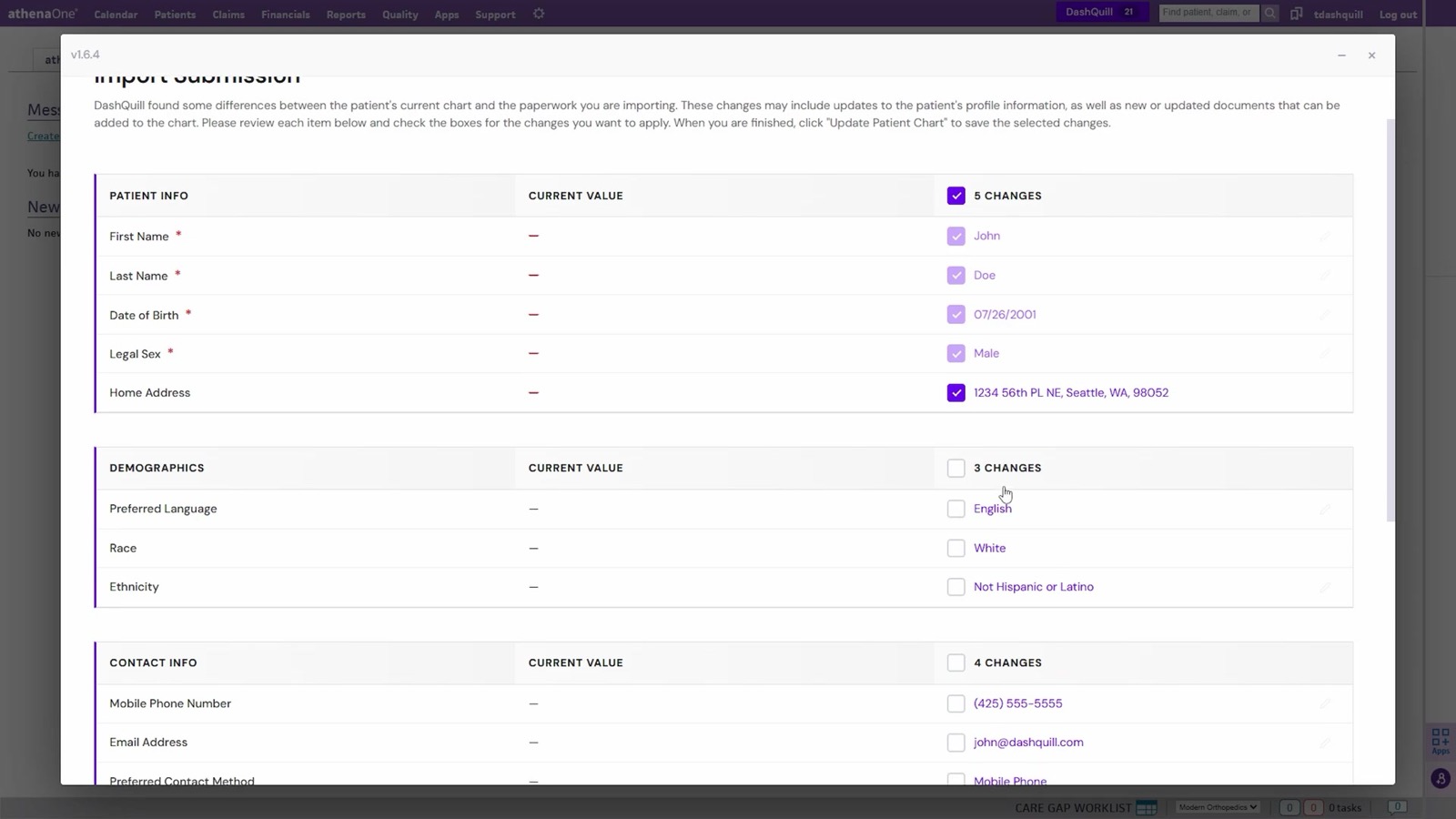
Here is what it does at each step of the loop:
- Sending: by text or email, with no login for the patient. Forms open blank by default and carry no PHI, and prefilling from the chart is optional.
- Chasing: the pending list shows who has not finished, and one click resends the packet.
- Lobby fallback: a public forms page for your office that you open on a tablet. Submissions land in the same queue as texted ones.
- Review: the screen shows only the fields that differ from the chart, each with its own checkbox.
- Written to the chart: demographics, contacts, emergency contacts, insurance, preferred pharmacy and signed documents. It can create the chart when there is none.
It is built for small and mid-size practices on athenahealth, including multi-location groups, and our team sets it up with you.
If previsit intake mostly works at your practice except for the last step, that is the part we can show you in fifteen minutes. Book a demo for your athenahealth workflow. The fields we write are listed on the athenahealth patient forms page.