




 Practice Fusion
 AthenaHealth
 eClinicalWorks
 AdvancedMD
A demo shows you one thing. “AI fax sorting” is four
Sit through a demo of AI fax sorting and you will watch a fax arrive, get a label, and land in the right queue. It looks like one feature. It is really four, and a demo tends to lead with whichever one works best and let you assume the rest.
That matters because the four fail in different ways, need different checks, and some of them you may not want at all. This guide takes them one at a time, shows how they fit together in a working office, and ends with a checklist for testing them on your own faxes.
We sell a product in this category, and there is a short section about it at the end.
Start by splitting the phrase into four capabilities
A model that reads faxes can answer four separate questions. Each one replaces something a person at your front desk does today.
| Capability | The question it answers | What a person does today | Where it tends to fail |
|---|---|---|---|
| Classification | What kind of document is this? | Skims the first page | Mixed packets, misleading cover sheets, new document types |
| Patient matching | Which patient is this about? | Reads name and DOB, searches the EHR | Handwriting, twins, name changes, no DOB on the page |
| Splitting | Is this more than one document or patient? | Notices while reading, prints and re-scans in pieces | Pharmacy batches, lab batches, family members in one packet |
| Routing | Who should act on this? | Knows the office and decides | Rules that live in people’s heads, provider not named on the page |
Score a vendor on each row, not on “AI” as a whole. A tool that classifies well and matches badly gives you a nicely labeled inbox where every fax still has to be searched by hand.
You will find these capabilities in three kinds of product: eFax portals, EHR fax modules, and third-party inboxes embedded in the EHR. The questions are the same for all three. What differs is where the fax lives, and whether filing it to the chart needs a download in between.
Classification is the easy part, until the packet is mixed
Classification is where most demos begin, because it is the capability that works best. The model reads the pages and picks a type: referral, refill request, lab result, records, billing, signature request, junk. Telling a clean lab result from a clean referral is rarely a problem.
Real faxes are not always clean. The ones that cause trouble sit in between:
- A referral letter that includes lab results.
- A hospital packet with a discharge summary, medication list and follow-up orders.
- A marketing flyer with a real records request on page four.
So the thing to test is not whether the tool gets the easy ones right. It is what the tool does when it is unsure. The honest design is a “not sure” category that goes to a person. A tool without one is either guessing confidently or dumping ambiguous faxes into the most common bucket, and you will not know which until something goes missing.
Patient matching helps the most and risks the most
Knowing what a fax is only gets you a label. Knowing who it is about changes how the inbox works. Once the model reads the name and date of birth off the page, the inbox becomes searchable by patient, filing starts with the patient already selected, and a referral for a new patient can become a chart without retyping.
It is also the one place where a wrong answer is expensive. A mislabeled fax is an annoyance. A lab result filed to the wrong chart is a clinical and compliance problem.
That is why matching needs one firm rule: the model proposes, a person confirms, and nothing is written to a chart on the model’s say-so alone. An exact match should be marked apart from a best guess. If there is no match, the person searches. If there are two, the person picks.
Three questions tell you how seriously a vendor takes this:
- Does matching ever file automatically? If yes, ask what happens when it files to the wrong patient, and get the answer in writing.
- How much of the fax does the model read? Some tools read every page, some only the first and last few. Either is defensible, but a packet that names the patient only on page twelve may come back with nothing to search on. You should know which kind you are buying.
- Where does the accuracy number come from? Accuracy depends on what your senders fax you. Typed referrals and handwritten pharmacy forms give very different results, and a demo on the vendor’s clean samples tells you nothing about your inbox.
Some faxes have to be split before any of that can happen
Classification and matching both assume a fax is about one patient. Plenty are not. A pharmacy sends a day’s refill requests as one twelve-page fax. A lab sends five patients’ results in one transmission. A hospital sends three family members’ records together because they were seen the same day.
A chart holds documents about one patient, so none of these can be filed as they arrive. The fax has to be cut into per-patient pieces first, and then each piece gets classified and matched on its own.
This is the least glamorous capability and the one high-volume offices need most. In many tools a person does the split by selecting pages. Some also offer an automatic split that reads the patient name on every page. Test it on a real batch, and check two things:
- What happens when a page names nobody?
- Does the original stay available, so a person can fix a wrong cut?
Routing is where the first three become useful
By this point the tool knows what the fax is and who it is about. Routing is the step that makes that knowledge worth having: it puts the fax in front of the person who handles it, and nobody else. There are two ways to build it.
Simple mode. You describe each tag in a sentence and the model picks the best fit. This is fine for an office with a handful of tags. It stops working once the rules get conditional.
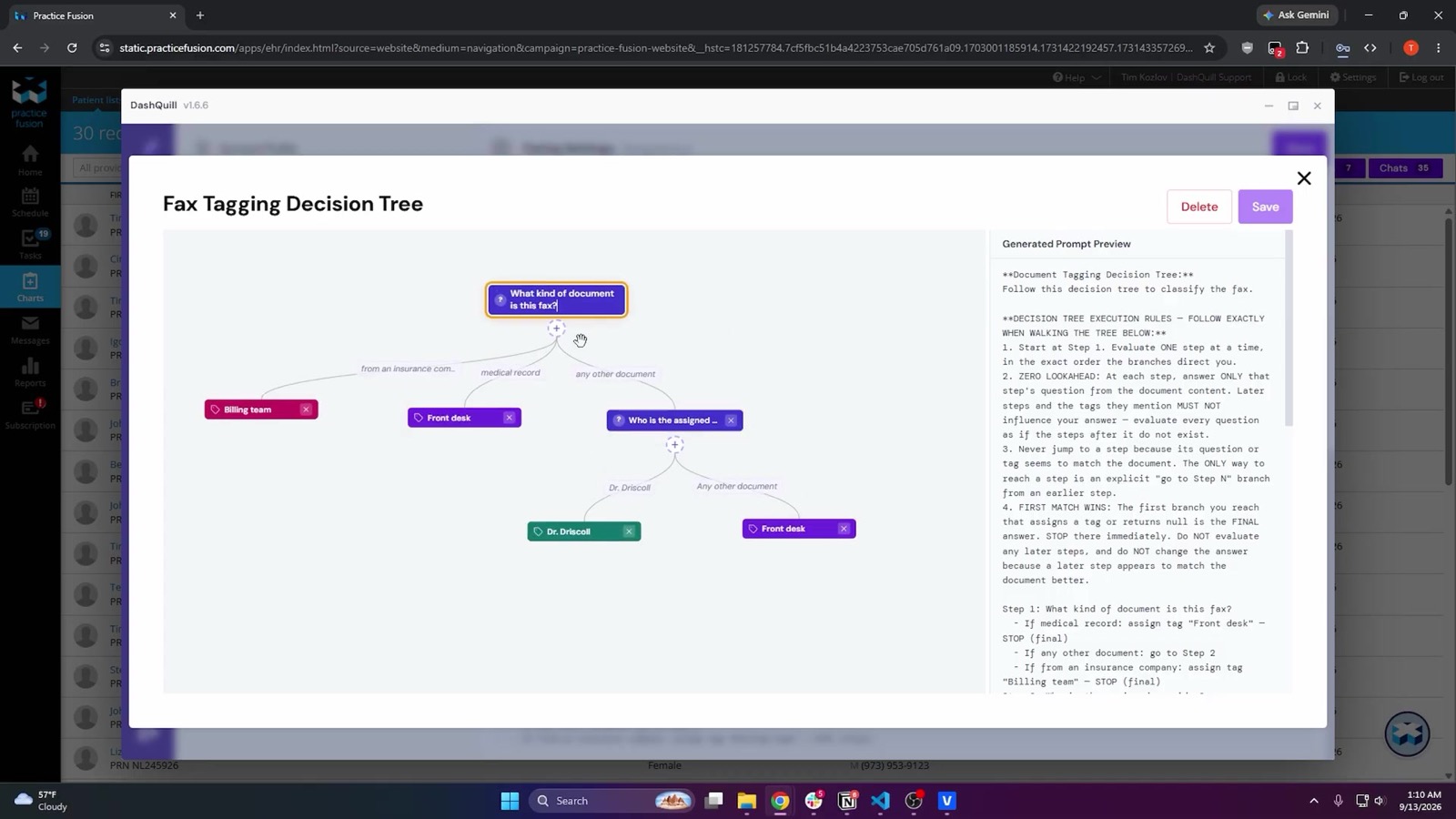
Decision tree. You write the rules as questions and answers, the way you would train a new hire: “What kind of document is this?” then “Which provider is named?” with a fallback for “none of these.” Every fax is walked through the tree.
For any group with more than a couple of providers, prefer the tree. The rules are visible, so when a provider asks why a result landed in someone else’s queue, anyone in the office can open the tree and see.
Routing produces tags, and tags produce virtual inboxes: one fax number for the practice, with each person filtered to their own tags. Two caveats keep this honest:
- A filter is a view, not a permission. In most tools, anyone with a login can clear the filter and see everything. If someone must be unable to see certain faxes, that is a separate access control question.
- Manual tagging never goes away. A person retags what the model got wrong, and whatever the rules cannot place goes to a person.
Put together, the model does the first pass and people decide
With all four capabilities running, a fax in a well-run office moves like this:
- It arrives and is read. A summary appears: patient, DOB, document type, provider named.
- It is tagged by the decision tree, or left untagged or in a catch-all if the tree cannot place it.
- It shows up in the owner’s filtered view.
- The owner opens it and decides: sign and fax back, file, split, or retag.
- It is filed. The closest charts are proposed and the document name is prefilled. The person picks the chart and confirms.
- It is marked resolved.
The model touches steps one, two and five. People own three, four and six. That division is the whole workflow, and it is the thing to hold a demo against. If a demo removes the people from three and four, ask how the office finds out when the model was wrong.
Now test it for a week on your own faxes
Everything above is a claim until you see it run on the faxes your senders actually send. Run the pilot for at least a week, and score each item as pass, fail, or not demonstrated.
Setup
- The vendor receives faxes on a test number, or on your real number in parallel with your current path.
- Your own tags and routing rules are configured, not the vendor’s samples.
- Your team does the confirming and filing.
Classification
- Send twenty mixed faxes from last month. Count the ones you would have tagged differently.
- Send one genuinely mixed packet. Where does it go?
- Send a marketing fax. Where does it go?
Patient matching
- A typed referral with a demographics sheet: is the right chart at the top, and is an exact match marked differently from a best guess?
- A handwritten refill request: same questions.
- A long records packet with the name only in the middle: does the tool find it, or does the person search?
- A patient with two charts: are both offered, or is one picked silently?
- A patient who does not exist: is there a create-chart path, and does a person confirm the fields?
- Get it in writing that nothing is filed without a person clicking.
Splitting
- Send a real pharmacy or lab batch. What does the tool do, and what does the person do?
- Send the same fax twice. Does the tool notice?
Routing
- Can you see and change the rules yourself, without a support ticket?
- Does the filter persist between sessions, and is it per user or per computer?
- Is the filter a view or a permission?
- Where does a fax go when the rules cannot place it, and who works that queue?
- Retag a fax by hand. Does it move immediately?
Operations
- Is the inbox searchable by patient name?
- Can a provider sign and return a fax without leaving the inbox?
- Does filing pass through a Downloads folder at any point?
- Where does the AI processing run, and is it covered by the BAA?
What you should end up with is a faster first pass, not zero-touch
If the pilot goes well, here is what changes. Every fax has been read before anyone opens it. The inbox is searchable by patient. Filing drops to a confirmation and a click.
Here is what does not change. Someone still staffs the exception queue, retags some faxes, checks splits, and confirms every match. An office that expects zero-touch will be disappointed by any vendor, and the vendors who promise it are the ones to be careful with.
Where DashQuill fits
Our fax inbox runs inside Practice Fusion, athenahealth, eClinicalWorks and AdvancedMD, and it does all four jobs described above:
- Reading. Our own model reads each fax as images, handwriting included. It pulls the patient’s name, date of birth and contact details, the document name, the provider named, the sending facility and the cover-sheet notes, plus a one-line summary.
- Matching. The closest charts in your EHR are listed with an exact match marked, and a person picks. Nothing is uploaded until they do. For a new patient, staff can create the chart from the fields read off the fax, ticking each field they trust.
- Splitting. By page selection, or automatically by patient, which reads every page and creates one child fax per patient while keeping the original in the archive.
- Routing. Simple mode or a decision tree, built from your own tags. An admin can change the tree without a ticket, and anything the tree cannot place goes to its own view or a catch-all tag for a person to work.
- Operations. Signing, dating and faxing back happen in the inbox. Filing puts the document in the chart without saving it on the computer. AI processing is covered by the BAA, and faxes are stored encrypted.
It is built for practices with real fax volume, from a busy single office to multi-location groups.
If you are still deciding which tags to create and who owns each one, the high-volume fax guide has a triage table and a sample routing policy. To run the checklist against our product, book a 15-minute demo and bring your ugliest faxes.